## How to Run VibeVoice AI
If you’ve been searching for **how to run VibeVoice AI**, the good news is that you don’t need any complicated setup. Instead of downloading large models and configuring hardware, you can **use VibeVoice instantly on our website**: [Start Using VibeVoice AI Here](https://www.vibevoiceai.com/vibevoice).
Before you dive in, let’s explore what makes VibeVoice such a game-changing tool for creators, developers, educators, and marketers.
---
## What Is VibeVoice AI?
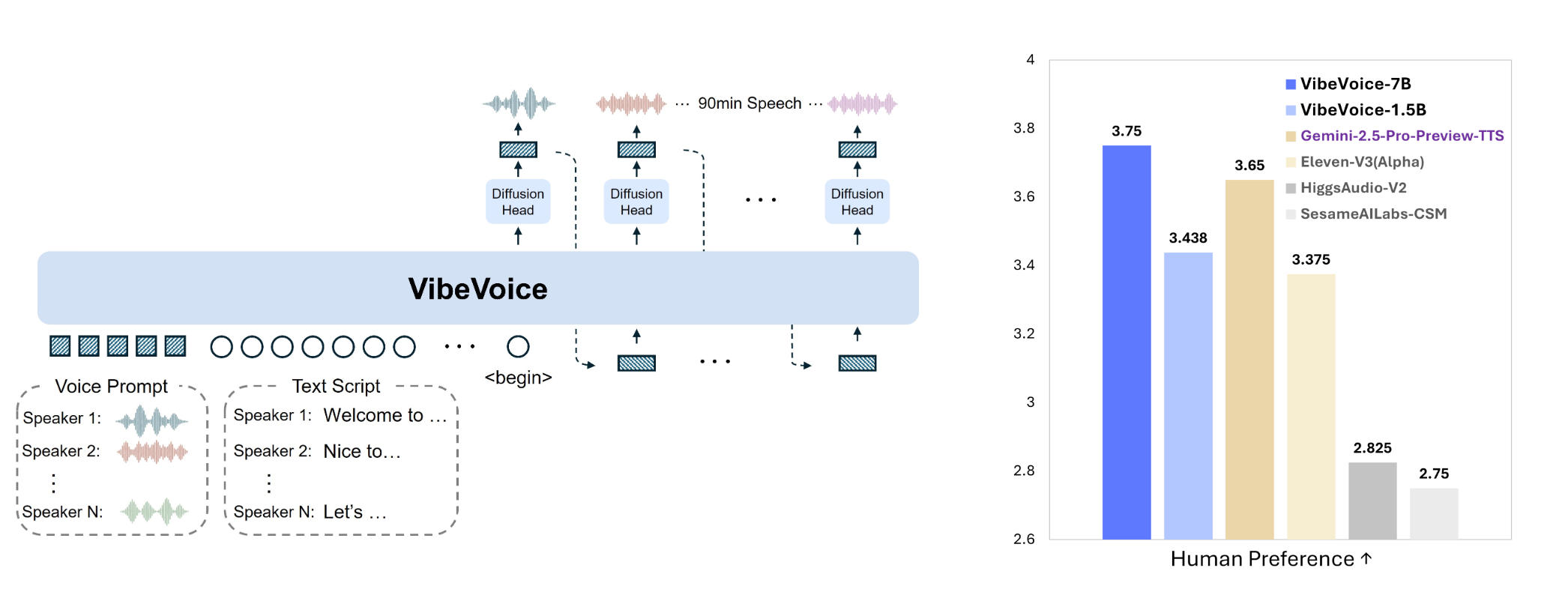
**VibeVoice AI** is Microsoft’s open-source long-form speech generation model, released in 2025. Unlike traditional text-to-speech (TTS) tools that only handle short clips, VibeVoice can generate **up to 90 minutes of continuous, natural-sounding audio** with multiple distinct speakers.
Key features include:
* 🎙 **Long-form speech**: Up to 1.5 hours of seamless narration.
* 👥 **Multi-speaker support**: Up to 4 different voices in one project.
* 🌍 **Multilingual capability**: English and Mandarin supported at launch.
* ⚡ **Flexible models**: From lightweight streaming models to large, high-quality ones.
* 🔒 **Built-in safety**: Audio watermarking and AI disclaimers to ensure responsible use.
---
## Why Choose VibeVoice?
Compared to commercial tools, VibeVoice stands out because it’s:
* **Open-source and research-driven** — transparent and free for innovation.
* **Optimized for storytelling and long content**, not just single phrases.
* **Customizable for different workflows**, whether podcasts, lectures, or media production.
And the best part? You don’t need powerful GPUs or technical knowledge. Simply **use it online at [VibeVoiceAI.com](https://www.vibevoiceai.com/vibevoice)**.
---
## Real-World Use Cases of VibeVoice
Here’s how different professionals can use VibeVoice today:
### 1. Podcast Production
Tired of scheduling voice actors or recording sessions? With VibeVoice, you can:
* Write your script.
* Assign up to four AI voices.
* Generate an entire **multi-speaker podcast episode** in minutes.
*Example*: A startup team can create a weekly podcast discussing tech news, using distinct voices for the host, guest, and narrator — all generated by AI.
---
### 2. Education & E-Learning
Educators and course creators can produce:
* Audiobooks.
* Narrated lessons.
* Language learning dialogues.
*Example*: An online language teacher can generate a **30-minute bilingual lesson**, switching between English and Mandarin voices for dialogue practice.
---
### 3. Marketing & Content Creation
Marketers can easily create professional audio content for campaigns:
* Product explainers.
* Social media ads.
* Voiceovers for YouTube videos.
*Example*: A digital agency can quickly generate multiple **voiceover versions of an ad**, testing which one resonates best with different audiences.
---
### 4. Game Development & Storytelling
Developers and writers can prototype character dialogue:
* RPG side quests with different character voices.
* Audiobooks with narration + character interaction.
*Example*: An indie game developer can generate dialogue for **four characters in a fantasy quest**, each with a distinct voice, bringing the script to life instantly.
---
## How to Get Started
Running VibeVoice doesn’t require downloads or installations. You can try it right away:
👉 [**Start Using VibeVoice AI Now**](https://www.vibevoiceai.com/vibevoice)
Simply enter your text, select voices, and generate high-quality audio in seconds.
---
## Conclusion
If you’re looking for **how to run VibeVoice**, the easiest way is online. No hardware requirements, no setup — just powerful AI speech generation at your fingertips.
Whether you’re a **podcaster, educator, marketer, or developer**, VibeVoice AI empowers you to create natural, long-form audio like never before.
👉 Try it today: [vibevoiceai.com](https://www.vibevoiceai.com/vibevoice).
How to Run VibeVoice AI: Features, Use Cases & Online Access
VibeVoice Team•September 5, 2025•3 min