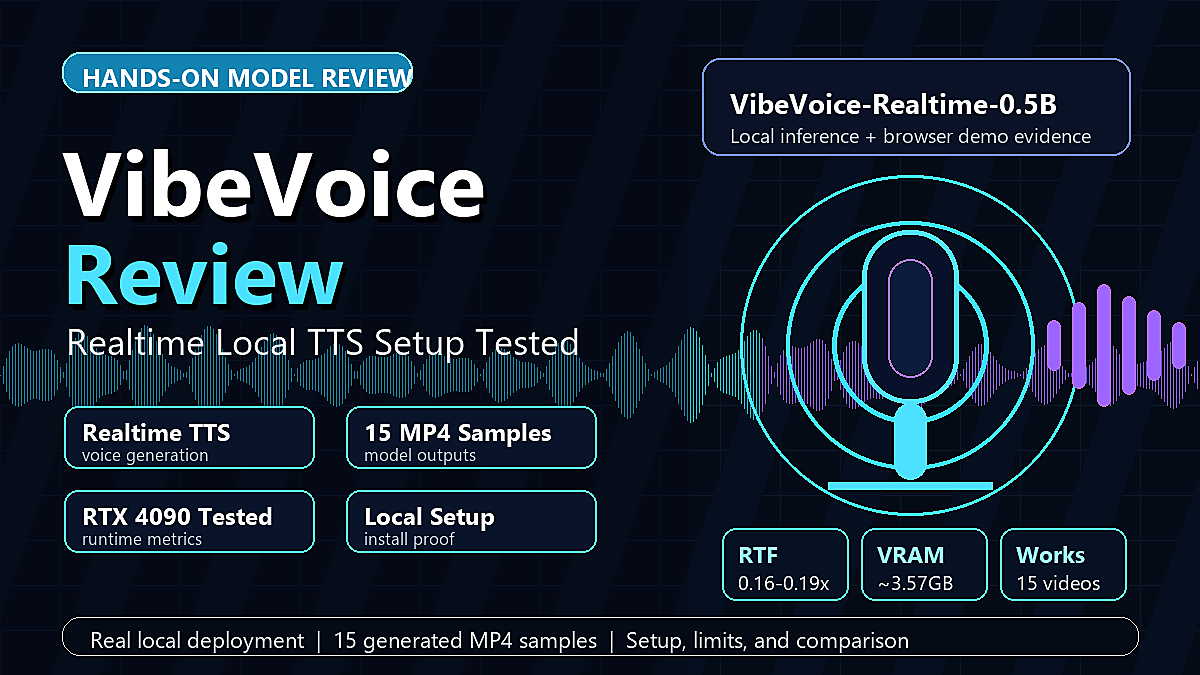
My short verdict: VibeVoice-Realtime-0.5B is a real, usable local text-to-speech model, but it is not the same product as the earlier long-form multi-speaker VibeVoice-TTS demo that made the project famous. In my local test, the realtime model generated clear English speech quickly after the model was already loaded, used about 3.6 GB of VRAM on an RTX 4090, and produced a working browser demo with streaming logs. The biggest practical catch is setup friction. The official 1.5B long-form TTS path is currently disabled in the Microsoft repository, while the supported hands-on path is the Realtime 0.5B model.
That distinction matters. If you came looking for a podcast generator that can create long, multi-speaker conversations from a script, VibeVoice-Realtime is not that. If you want a small research model for single-speaker streaming TTS experiments, it is much more convincing. I tested the official repository, the official VibeVoice-Realtime-0.5B model, the command-line inference script, and the browser demo. I also kept the failed setup steps in my notes because they are exactly the kind of problems a developer will hit when trying to reproduce this model outside a hosted notebook.
What I Tested
I focused this review on the model path that is currently reproducible from the official repository: VibeVoice-Realtime-0.5B. Microsoft describes VibeVoice as a family of voice AI models covering TTS and ASR. The older VibeVoice-TTS-1.5B documentation still explains the long-form idea, including up to about 90 minutes of speech and up to four speakers, but its installation section says usage is disabled due to widespread misuse. The Realtime 0.5B documentation, by contrast, still includes install and run commands. It also gives the Realtime variant a narrower shape: single-speaker streaming TTS, an 8k context window described as roughly 10 minutes of audio generation, English as the intended target, and other languages as exploration rather than a guarantee.
My test environment used an NVIDIA RTX 4090 with a CUDA-capable PyTorch install. I used a uv-created virtual environment, but I reused the system CUDA/PyTorch stack because a clean dependency install tried to re-download large CUDA wheels even though a working GPU build of PyTorch was already installed. The final environment used Python 3.10, torch 2.9.1 with CUDA 12.8 support, transformers 4.51.3, gradio 6.12.0, and the official VibeVoice code installed in editable mode.
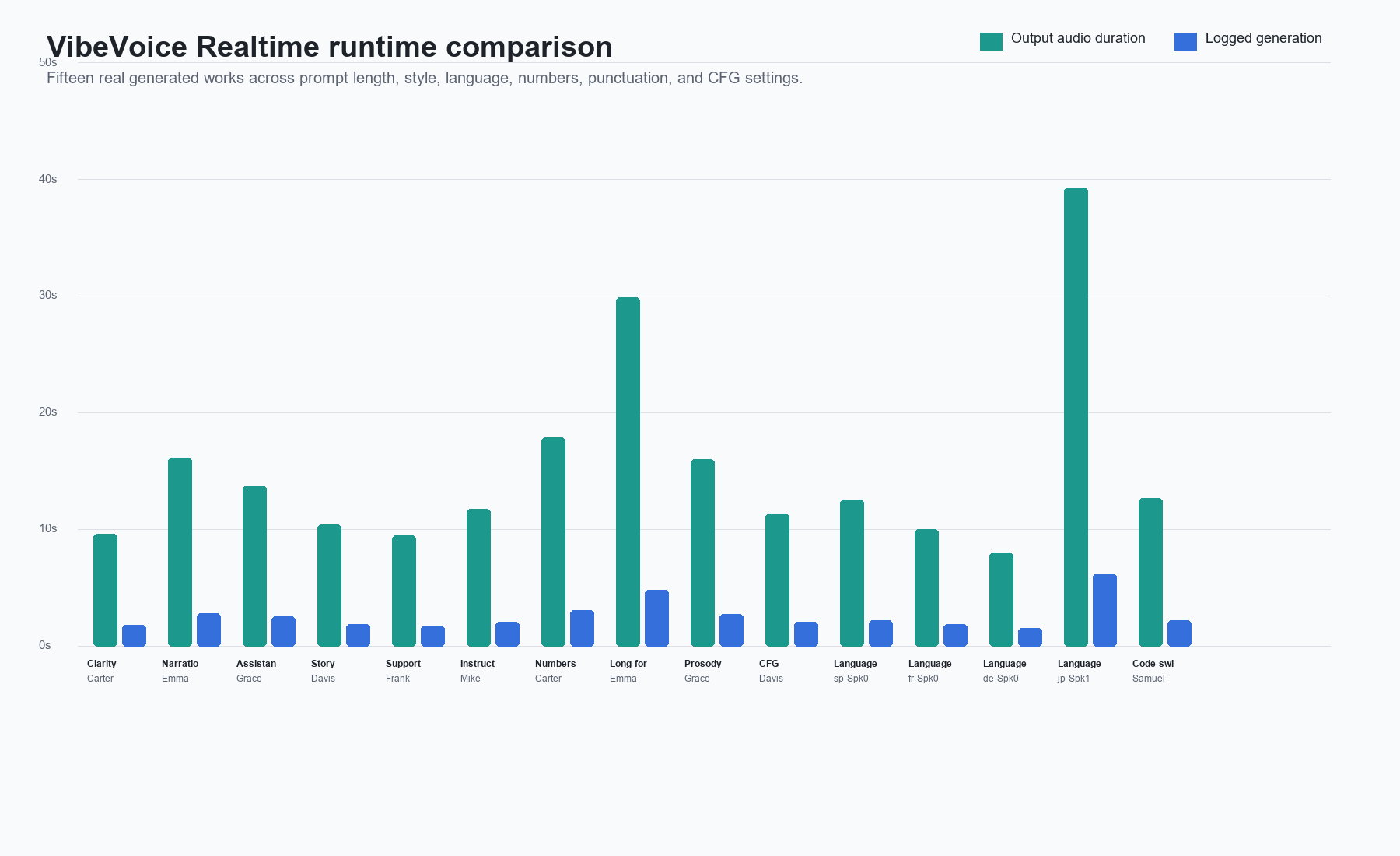
I ran fifteen command-line generated works across different test aspects. The Work column embeds only the playable MP4 sample cards made from actual VibeVoice-generated audio; each video includes an accessible label that describes the sample. The separate browser demo is covered in the evidence section below.
| Test aspect | Work | Speaker | Output duration | Generation time | RTF | VRAM note |
|---|---|---|---|---|---|---|
| Clarity | Carter | 9.60 s | 1.83 s | 0.19x | 3,574 MiB | |
| Narration | Emma | 16.13 s | 2.79 s | 0.17x | 3,578 MiB | |
| Assistant | Grace | 13.73 s | 2.55 s | 0.19x | about +3,179 MiB | |
| Story | Davis | 10.40 s | 1.85 s | 0.18x | about +3,177 MiB | |
| Support | Frank | 9.47 s | 1.73 s | 0.18x | about +3,103 MiB | |
| Instruction | Mike | 11.73 s | 2.06 s | 0.18x | about +3,175 MiB | |
| Numbers | Carter | 17.87 s | 3.05 s | 0.17x | about +3,183 MiB | |
| Long-form | Emma | 29.87 s | 4.82 s | 0.16x | about +3,187 MiB | |
| Prosody | Grace | 16.00 s | 2.72 s | 0.17x | about +3,179 MiB | |
| CFG | Davis | 11.33 s | 2.07 s | 0.18x | about +3,177 MiB | |
| Language | sp-Spk0 | 12.53 s | 2.18 s | 0.17x | 3,576 MiB | |
| Language | fr-Spk0 | 10.00 s | 1.84 s | 0.18x | about +3,189 MiB | |
| Language | de-Spk0 | 8.00 s | 1.51 s | 0.19x | about +3,111 MiB | |
| Language | jp-Spk1 | 39.33 s | 6.21 s | 0.16x | about +3,191 MiB | |
| Code-switch | Samuel | 12.67 s | 2.18 s | 0.17x | about +3,183 MiB |
The cold first run took 159.8 seconds end to end because it included model download, tokenizer loading, model initialization, fallback from FlashAttention 2 to SDPA, and generation. Once the model weights were cached, command-line runs took about 7.9 to 13.5 seconds wall time when the local cache path was clean. One later assistant sample took 182.8 seconds wall time because the process retried model-card HEAD requests before falling back to cached files, even though its actual generation portion was still logged at 2.55 seconds. Across the fifteen generated works, the model generation portion stayed between 1.51 and 6.21 seconds.
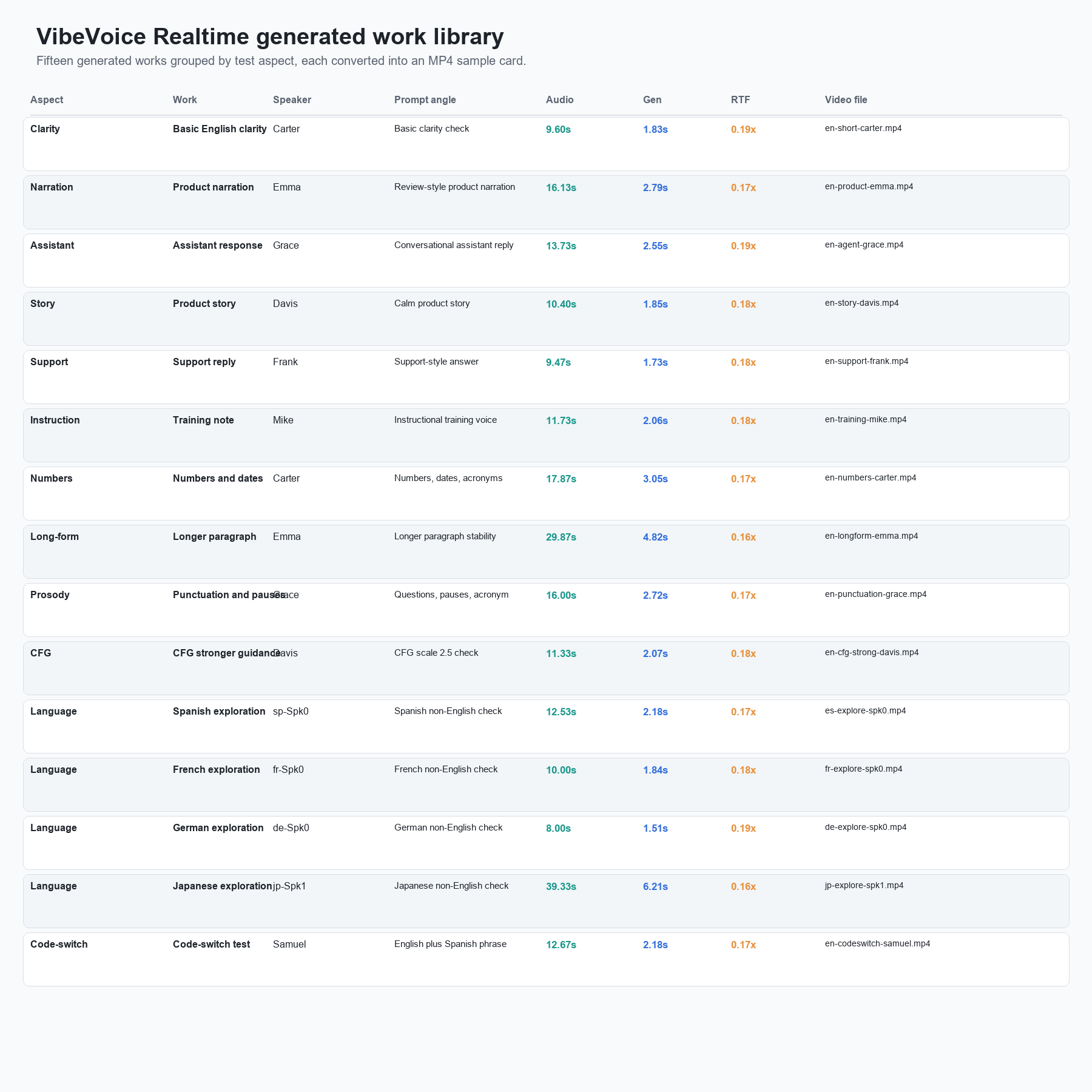
The English clips were the most useful. I did not treat them as just different voice names. I used them to check clarity, product narration, assistant replies, support tone, training-style instructions, numbers and acronyms, longer paragraph stability, punctuation handling, and a stronger CFG setting. That made the sample set much less narrow than a single demo paragraph repeated with different speakers. I would not call the result a polished studio voice; it still has the slight synthetic smoothness and occasional prosody flatness that I expect from a small local TTS model. But it was more than good enough to prove the local setup and useful enough for prototypes, narration drafts, and latency experiments.
The Spanish, French, German, and Japanese clips should be treated differently. The official Realtime documentation says the model is primarily built for English, and multilingual behavior is exploratory. My tests followed that framing. All four non-English prompts produced playable WAV files and MP4 sample cards, and the model did not crash, but I would not use these results as evidence that VibeVoice-Realtime is ready for production multilingual TTS. They are better described as curiosities that can be tested, not core promises.
Browser Demo Evidence
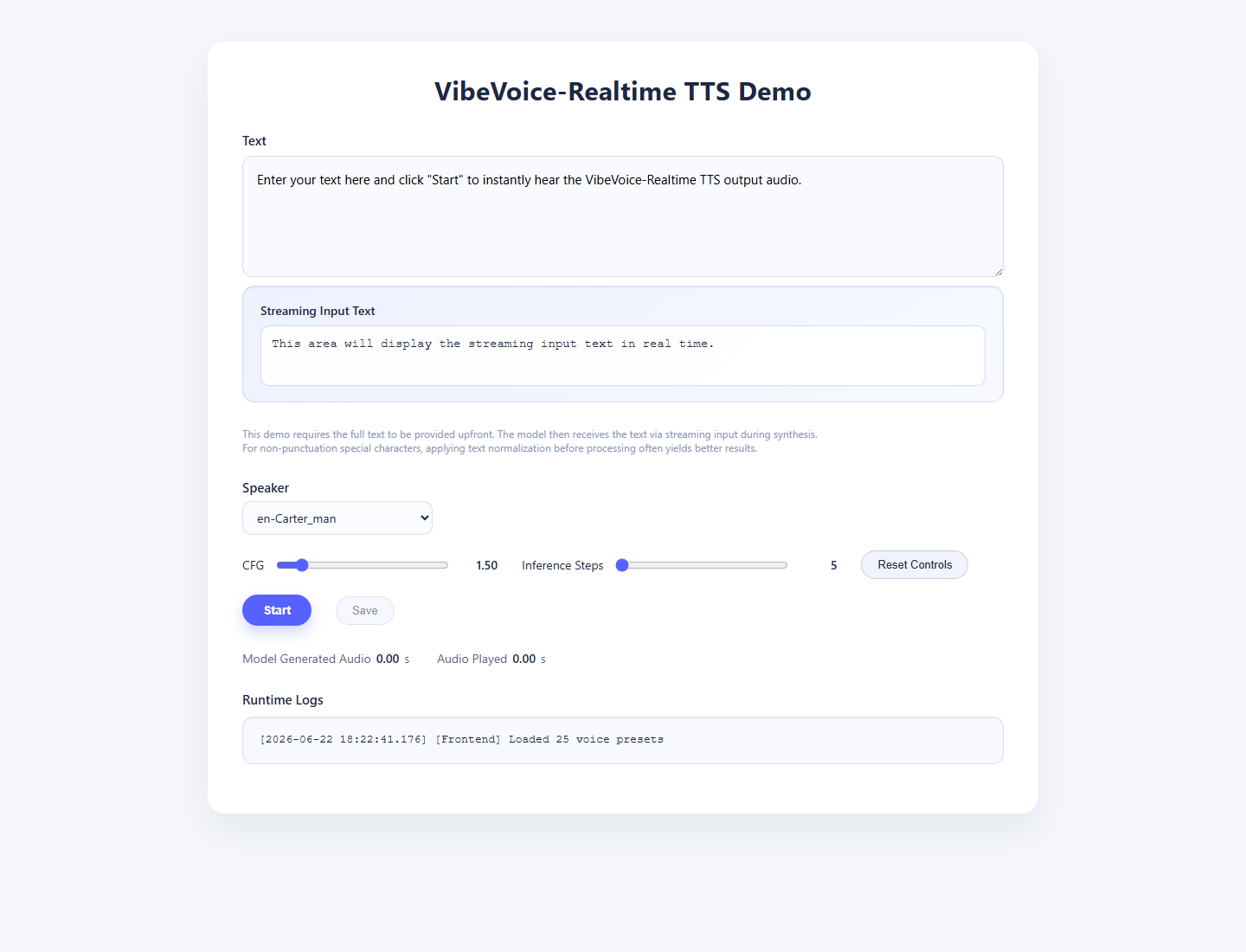
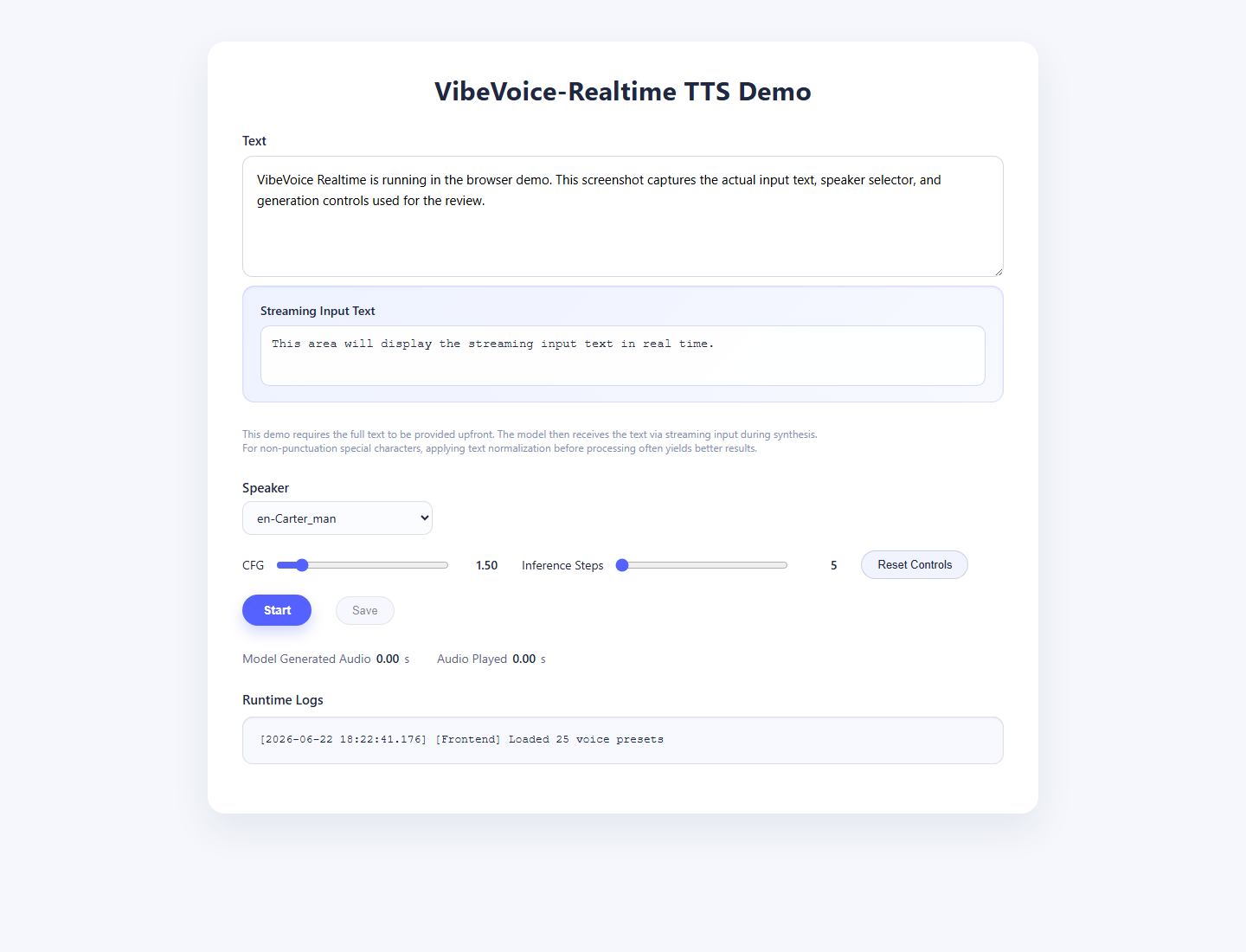
The official browser demo also worked after the model was loaded. Because the service was not exposed publicly from the test machine, I accessed it through a local SSH tunnel and captured the page without showing any private host details. The interface loaded 25 voice presets, accepted a prompt, let me choose en-Carter_man, and exposed CFG and inference-step controls.
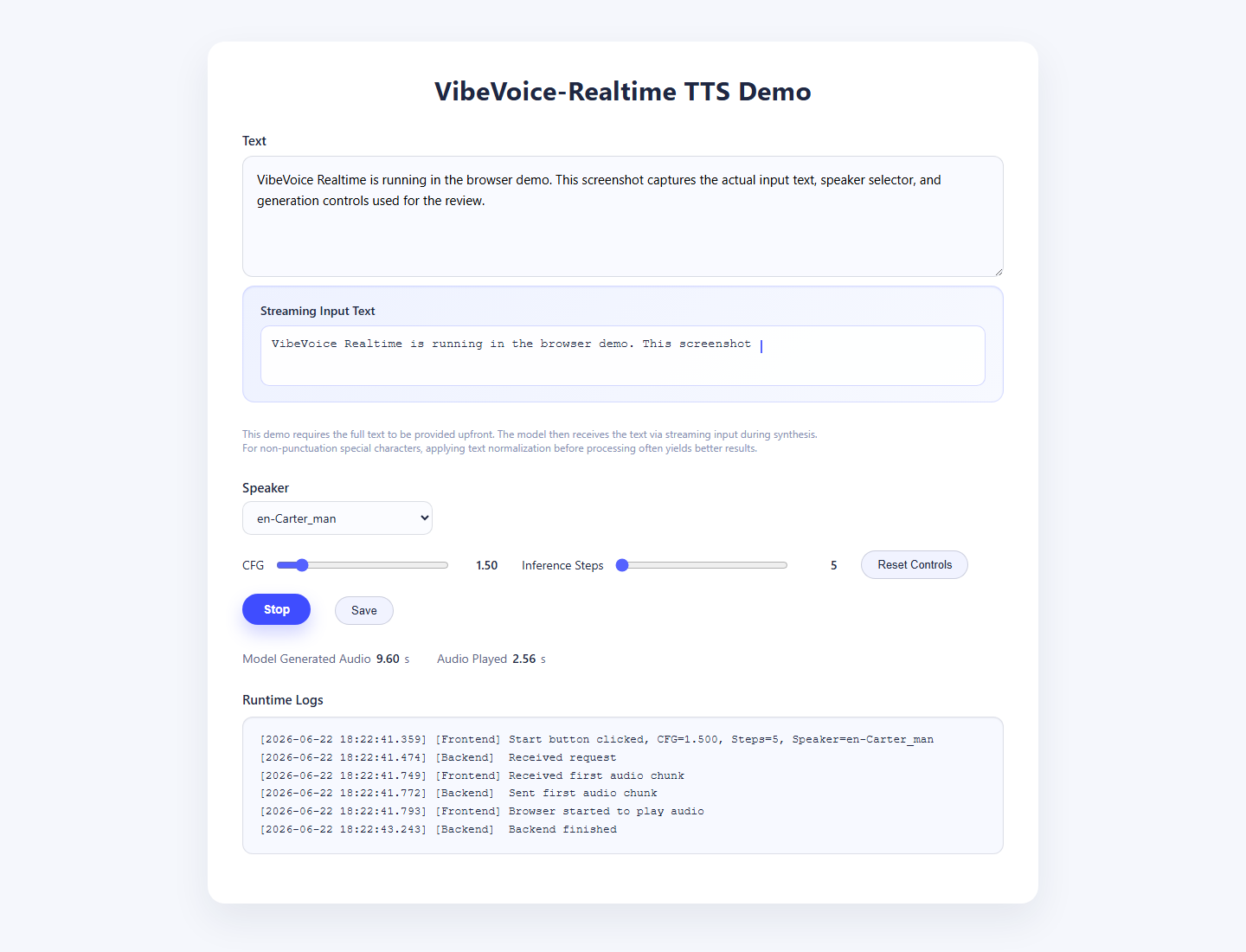
The browser result screenshot is important because it proves more than a saved WAV file. The frontend log shows the Start click, the backend request, the first audio chunk received by the browser, audio playback starting, and backend completion. The UI reported 9.60 seconds of model-generated audio. That matches the command-line short sample duration and confirms that the WebSocket demo path is usable.
The demo does require the full text upfront. The page itself says the model receives the text via streaming input during synthesis, but the browser form is not a free-form live typing interface where it speaks while the user continues typing. For a local application developer, that difference matters. The model architecture is designed around streaming chunks, yet the demo is still a controlled test harness.
How I Read The Latency Claim
VibeVoice-Realtime is usually described around a first-audible-speech latency claim in the low hundreds of milliseconds. The exact number is easy to misread because different official surfaces phrase it differently: the current Realtime documentation says about 200 milliseconds, while the Hugging Face model card text I checked describes roughly 300 milliseconds, both with hardware dependence. My browser run does not prove or disprove either number as a laboratory measurement because I measured through the demo page, browser audio, a WebSocket connection, and a GPU service that was already loaded.
What I can say from my run is more practical: the demo felt responsive once the model was resident in memory. The frontend log recorded the Start click at 18:22:41.359, the backend request at 18:22:41.474, the first audio chunk received at 18:22:41.749, and browser playback at 18:22:41.793. That puts my observed demo-path first-chunk behavior in the same general range as the official claim, even though it is not a calibrated benchmark. The backend finished at 18:22:43.243, while the UI reported 9.60 seconds of generated audio.
That distinction is useful for readers. If you are choosing a model for an interactive agent, first-chunk behavior matters more than total WAV file time. If you are choosing a model for batch narration, total generation time and audio quality matter more. VibeVoice-Realtime is clearly built for the first use case. It starts producing audio early and then continues streaming. The official docs also frame it as capable of longer single-speaker output through an 8k context window, but I did not validate a 10-minute run in this review. My command-line samples support the low-latency short-clip reading: the actual generation stage was much faster than real time, but the cold first run was slow because model download and startup dominated.
I would therefore describe VibeVoice-Realtime as low-latency after load, not instant from a cold machine. That is a fairer description than either hype or dismissal. A production app would keep the service warm, monitor GPU memory, and measure first audio from the client side under its own networking conditions.
Runtime And Setup Notes
The runtime numbers were better than I expected for a 0.5B voice model running without FlashAttention 2. The script first tried FlashAttention 2 and failed because flash_attn was not installed. It then fell back to SDPA and still completed successfully. I would mention this in any serious setup guide because the official documentation says FlashAttention 2 is the fully tested path. In my test, SDPA was good enough to generate samples, but I would not use my SDPA run as the final word on maximum quality or latency.
| Item | Observed result |
|---|---|
| GPU | RTX 4090 |
| Python | 3.10 |
| PyTorch | 2.9.1+cu128 |
| Transformers | 4.51.3 |
| Model cache size after first run | about 2.0 GB |
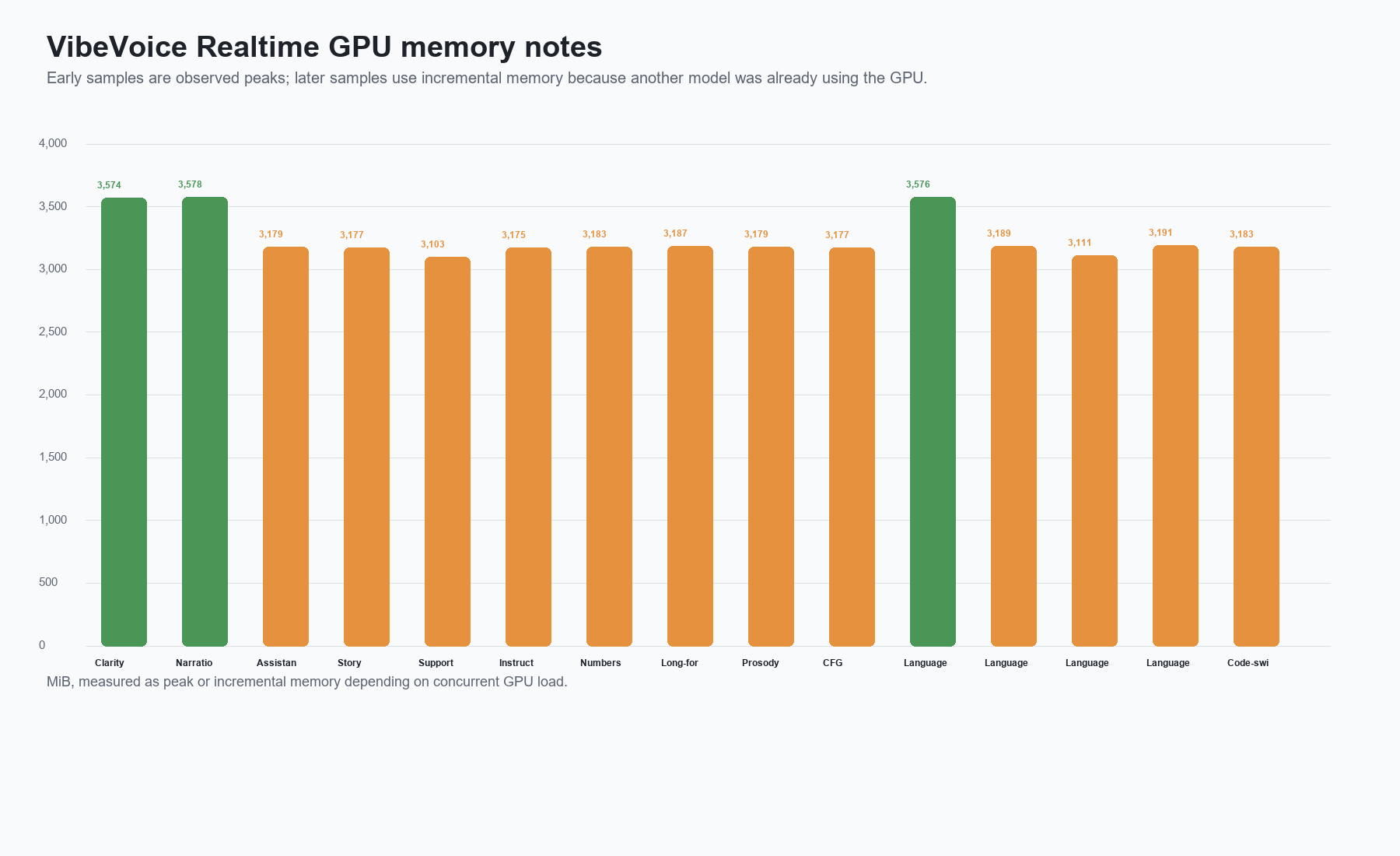
| Peak VRAM during command-line samples | about 3.57 GB |
| Demo idle VRAM after load | about 3.4 GB |
| First run wall time | 159.8 s including download and load |
| Cached/offline command-line wall time | about 8-13.5 s in the clean warm runs |
| Logged generation speed | 0.16-0.19 RTF across ten generated samples |
The biggest setup issue was not Python code. It was network and dependency behavior. A clean uv install initially tried to pull torch and multiple CUDA packages again, even though the machine already had a working CUDA PyTorch installation. Rebuilding the virtual environment with system site packages and then installing only the missing project dependencies avoided a long duplicate download. The second issue was Hugging Face connectivity. The machine could not reach huggingface.co directly, but an HF-compatible mirror endpoint worked for downloading the model files.
That does not mean everyone should use those exact workarounds. If your machine can reach Hugging Face directly and you do not already have CUDA PyTorch installed, the simpler official install path may be cleaner. If you already have a known-good PyTorch GPU environment, it is worth checking whether your package manager is about to download a second CUDA stack before letting it run for an hour.
For readers looking for a plain VibeVoice install story, my experience was a reminder that "small model" does not always mean "small setup." The model itself is manageable, but the Python environment can become heavy if the resolver decides to fetch a fresh GPU stack. I would start every local setup by checking python -c "import torch; print(torch.__version__, torch.cuda.is_available())" before installing VibeVoice dependencies. If that command already reports a CUDA-enabled torch build, preserve it. If it does not, solve PyTorch first, then install the VibeVoice package.
For readers looking for a VibeVoice benchmark, I would treat my numbers as practical reproduction data rather than a formal academic benchmark. I did not run a speech-recognition WER pipeline, human MOS panel, or speaker similarity model. I measured what a developer usually needs first: whether the official scripts run, how long first setup takes, how much VRAM the model consumes, how quickly it produces short clips, and whether the browser demo actually streams audio. The ten saved works cover six English voice/use-case combinations plus Spanish, French, German, and Japanese exploration checks, so they give a better first-pass read than a single cherry-picked sample. Those numbers are enough to decide whether the model is worth deeper evaluation on your own prompts.
One more practical note: the warm wall time includes loading the model into a new Python process each time. A persistent service should feel faster than repeated command-line invocations because the model stays resident in GPU memory. The browser demo showed that behavior clearly: after startup, it accepted a prompt and produced the first audio chunk quickly. That is why I would evaluate VibeVoice-Realtime as a service model, not just as a batch script.
Quality Assessment
My practical quality read is simple: VibeVoice-Realtime sounds useful, but it does not erase the difference between a small local research model and a mature commercial voice platform. The generated speech was intelligible, stable on short English prompts, and fast after the model was loaded. The voices had enough variation to test different presentation styles. Carter worked well for a neutral technical sample. Emma fit the product narration prompt better. The Spanish exploration sample completed, but I would not build a multilingual product around that result without far more testing.
The model's strongest point is responsiveness. The browser log captured the first audio chunk less than half a second after the Start click in that run, and the backend finished quickly. The command-line samples show the same pattern from another angle: every saved clip was longer than the logged generation time by a wide margin, with RTF between 0.17x and 0.19x. That does not exactly equal perceived end-user latency in every network or audio stack, but it supports the official positioning: this is a realtime-oriented model, not just a batch WAV generator.
Its weakest point is scope. The name VibeVoice can lead people to expect the original long-form multi-speaker podcast model. The currently reproducible Microsoft path is narrower. VibeVoice-Realtime is single-speaker, has embedded voice presets, and is presented as English-first. That makes it easier to deploy, but less flexible than people may expect if they saw older 1.5B demos or community forks.
The second weakness is setup transparency. The model printed warnings about tokenizer class mismatch and many acoustic-tokenizer weights being newly initialized. The sample still generated, and the same messages appeared in both command-line and web-demo paths. I would not panic over the warning by itself because the official demo script runs through it, but I would not hide it either. It is part of the real local experience.
VibeVoice Realtime Vs VibeVoice TTS
This is the most important comparison in the review. VibeVoice-TTS-1.5B is the model people associate with long-form multi-speaker speech and podcast-style generation. The official TTS documentation describes up to about 90 minutes of speech with up to four distinct speakers for the 1.5B model, but the same page currently says installation and usage are disabled because of misuse concerns. In other words, the model page and paper are still useful for understanding the architecture, but they are not a reliable current setup path from the official repository.
VibeVoice-Realtime-0.5B is smaller and more deployable. It supports single-speaker realtime TTS, uses precomputed voice presets, and targets low-latency output. It is the right choice if your question is: "Can I run a Microsoft VibeVoice TTS demo locally today?" It is the wrong choice if your question is: "Can I generate a four-speaker 90-minute show from the official Microsoft code today?"
That distinction should shape expectations:
| User goal | Better fit |
|---|---|
| Local streaming TTS prototype | VibeVoice-Realtime-0.5B |
| Browser demo with saved audio | VibeVoice-Realtime-0.5B |
| Long-form multi-speaker podcast generation | Not the current official Realtime path |
| Voice cloning from arbitrary prompt audio | Not the current official Realtime path |
| English narration experiments | VibeVoice-Realtime-0.5B |
| Production multilingual TTS | Needs more testing and probably another model |
VibeVoice Realtime Vs CosyVoice2, SparkTTS, And Seed-TTS
The official Realtime documentation compares VibeVoice-Realtime against models such as SparkTTS, Seed-TTS, FireRedTTS, MaskGCT, and CosyVoice2 on benchmark tables. I would not reduce the decision to one WER number. These models have different product shapes.
CosyVoice2 is a stronger place to start if your priority is multilingual zero-shot voice work and a larger ecosystem around voice cloning style tasks. SparkTTS and Seed-TTS are often discussed around speech quality and benchmark performance. VibeVoice-Realtime's advantage is its specific streaming orientation and small footprint. In my test, the model used under 4 GB VRAM and generated short clips quickly after load. That is a good local prototype profile.
If I were choosing a model for a developer demo where the user clicks a button and quickly hears a sentence, VibeVoice-Realtime would be on my shortlist. If I were choosing a model for multilingual production narration, I would compare it against CosyVoice2 and other multilingual systems with a larger sample set. If I were choosing a model for long-form podcast generation, I would not use the official Realtime model as a substitute for the disabled long-form TTS path.
What Other VibeVoice Pages Often Miss
Several pages and social posts about VibeVoice blur together three different things: the original long-form TTS paper, the disabled 1.5B TTS setup path, and the newer Realtime 0.5B demo. That makes the model look more confusing than it needs to be. The safest way to read VibeVoice today is as a family name, not a single product. The ASR model, the long-form TTS work, and the Realtime TTS model have different goals and different availability.
The most common mistake is calling the Realtime 0.5B path a multi-role or multi-speaker podcast model. The official Realtime documentation says the opposite: this variant supports only a single speaker, and users who need multi-speaker conversational generation are pointed toward other VibeVoice models. That line should shape the entire review. A reader can fairly say Realtime is intended for streaming and longer single-speaker generation; a reader should not treat it as proof that the current official Realtime path generates four-speaker podcasts. My article keeps the browser demo, generated WAV files, and setup commands focused on the Realtime model because that is the path I could actually reproduce.
The second common gap is evidence. Many summaries repeat benchmark tables or feature bullets, but they do not show a local UI screenshot, a playable generated sample, a failed dependency branch, or GPU memory during a run. That is why I included screenshots and MP4 sample cards even though they make the article longer. Without those artifacts, it is too easy to confuse a hosted demo, a paper claim, and a working local deployment.
The third gap is practical setup detail. A user who already has CUDA PyTorch installed may not want a package manager to download another full GPU stack. A user in a restricted network may need a reachable model endpoint. A user expecting a voice cloning tool needs to know that the official Realtime path uses presets. These details are not glamorous, but they decide whether a reader can reproduce the result.
Best Use Cases
The best use case is local realtime TTS research. You can run a browser demo, inspect the WebSocket behavior, adjust CFG and inference steps, and save generated audio. That makes it useful for testing product ideas where voice response latency matters.
The second good use case is internal narration drafts. If you need a quick English placeholder voice for a product walkthrough, a generated UI narration, or a prototype assistant, the model can produce practical audio without calling a hosted API.
The third use case is studying modern speech model architecture. VibeVoice is interesting because of its low-frame-rate acoustic tokenizer idea and next-token diffusion framing. Even if you do not ship the model, the repository is useful for learning how a realtime TTS system can be structured.
I would avoid using it for impersonation, voice cloning of real people, or any workflow where listeners might mistake synthetic speech for a real person's consented recording. Microsoft is explicit about deepfake and misinformation risk, and my own view is that synthetic voice demos should be labeled clearly.
There is also a fourth, more tactical use case: evaluating whether a local voice feature needs a hosted API at all. VibeVoice-Realtime will not match every commercial voice product, but it gives developers a local baseline. If a product only needs short English responses, local control, and acceptable synthetic narration, this model can reduce dependency on external services during prototyping. If the product needs polished brand voice, multilingual consistency, voice identity controls, or legal-grade consent workflows, VibeVoice-Realtime is better used as a benchmark target than as the final system.
Limitations I Would Not Ignore
The first limitation is the official repo state. The long-form TTS code path that many people want is disabled. Treat old tutorials and community forks carefully because they may not match the current Microsoft repository.
The second limitation is language coverage. The Realtime model is English-first. Additional voices and languages are interesting, but the official docs describe multilingual behavior as exploratory. My Spanish, French, German, and Japanese files generated successfully, but that is not enough to claim broad multilingual reliability.
The third limitation is voice control. Realtime uses embedded voice presets. That helps with latency and safety, but it means the model is not a general custom voice cloning tool in the official path.
The fourth limitation is dependency sensitivity. The official docs recommend an NVIDIA PyTorch container. My non-container setup worked, but it required careful handling of PyTorch, transformers, and model download endpoints. A clean Docker setup may be simpler for many users.
The fifth limitation is warning noise. The model can run despite warnings about FlashAttention fallback and some checkpoint initialization messages, but those logs are part of the real deployment experience. A production team would need to decide whether to install FlashAttention, freeze package versions, and add health checks before exposing the service.
Scorecard
| Category | Score | Notes |
|---|---|---|
| Local install reproducibility | 7/10 | Works, but dependency and Hugging Face access can slow setup |
| English speech usability | 8/10 | Clear enough for prototypes and narration drafts |
| Realtime behavior | 8/10 | Fast first chunk in the browser demo and low RTF in CLI tests |
| Multilingual readiness | 5/10 | Experimental; my Spanish, French, German, and Japanese samples worked but need caution |
| Flexibility | 6/10 | Preset voices only in official Realtime path |
| Documentation clarity | 7/10 | Realtime docs are usable; project naming can confuse TTS expectations |
| Production readiness | 5/10 | Better as research/prototype unless hardened and evaluated |
Installation Environment
| Requirement | My working setup |
|---|---|
| OS | Linux with NVIDIA GPU |
| GPU | RTX 4090 class GPU |
| Python | 3.10 |
| Package manager | uv venv plus pip for selective install |
| PyTorch | Existing CUDA PyTorch build reused |
| Model | microsoft/VibeVoice-Realtime-0.5B |
| Demo port | Any available local port |
VibeVoice Setup Commands
These commands are written for a Linux machine with NVIDIA drivers and a working CUDA PyTorch install. If you do not already have PyTorch installed, follow the official PyTorch instructions for your CUDA version first, or use the NVIDIA container route from the VibeVoice docs.
mkdir -p ~/models
cd ~/models
git clone https://github.com/microsoft/VibeVoice.git
cd VibeVoice

uv venv --python 3.10 --system-site-packages .venv
source .venv/bin/activate

python -m pip install --upgrade pip setuptools wheel
python -m pip install --upgrade-strategy only-if-needed \
  "transformers==4.51.3" accelerate diffusers tqdm numpy scipy librosa \
  ml-collections absl-py gradio av aiortc "uvicorn[standard]" \
  fastapi pydub requests

python -m pip install --no-deps -e .
If your machine can reach Hugging Face directly, the model will download automatically on first run. If your network blocks the main Hugging Face domain, set an endpoint that is appropriate for your region before running inference.
export HF_HOME=~/hf_cache
# Optional, only if your network requires it:
# export HF_ENDPOINT=https://hf-mirror.com
Run Command-Line Inference
Create a simple input file:
mkdir -p test_inputs outputs
cat > test_inputs/en_short.txt <<'TXT'
VibeVoice Realtime is running locally. This short sample checks whether
the model can produce clear English speech from a simple paragraph.
TXT
Run the official file inference script:
python demo/realtime_model_inference_from_file.py \
  --model_path microsoft/VibeVoice-Realtime-0.5B \
  --txt_path test_inputs/en_short.txt \
  --speaker_name Carter \
  --output_dir outputs/en_short
Run The Browser Demo
export VOICE_PRESET=en-Carter_man
python demo/vibevoice_realtime_demo.py \
  --model_path microsoft/VibeVoice-Realtime-0.5B \
  --port 8000
Open the demo in a browser, select a voice, enter text, and press Start. In my run, the UI loaded 25 voice presets and logged the first audio chunk, browser playback, and backend completion.
FAQ
Is this a VibeVoice review of the 1.5B model or Realtime 0.5B?
This is a VibeVoice Realtime review focused on the currently reproducible official Realtime 0.5B path. I discuss the 1.5B long-form TTS model because many readers search for it, but the official TTS install path is currently disabled.
Can VibeVoice Realtime generate long podcasts?
Not in the same way as the earlier long-form VibeVoice-TTS model. The Realtime model is single-speaker and aimed at streaming TTS. The official docs describe an 8k context window, roughly 10 minutes of audio generation, and robust long-form speech for this Realtime variant, but that is still not the same as the disabled multi-speaker podcast-style VibeVoice-TTS path.
How much VRAM did VibeVoice Realtime use?
My short command-line tests peaked around 3.57 GB of VRAM on an RTX 4090. The browser demo sat around 3.4 GB after the model loaded.
Does VibeVoice Realtime require FlashAttention 2?
The official docs recommend a CUDA environment where FlashAttention may be available. My run did not have flash_attn; the script fell back to SDPA and still generated audio. For best performance and closer alignment with the official tested path, installing FlashAttention 2 is worth evaluating.
Is VibeVoice Realtime multilingual?
English is the safer target. The official Realtime docs describe multilingual voices as exploratory. My Spanish, French, German, and Japanese tests generated audio, but I would not call that production multilingual support.
Is VibeVoice good for commercial products?
I would be cautious. The official materials frame the model as research and development oriented and include safety warnings around synthetic speech misuse. A commercial deployment would need stronger quality evaluation, consent controls, disclosure, logging, abuse prevention, and legal review.
Source Notes
- Official repository: microsoft/VibeVoice
- Official project page: VibeVoice project page
- Official Realtime documentation: vibevoice-realtime-0.5b.md
- Official long-form TTS documentation: vibevoice-tts.md
- Official model page: microsoft/VibeVoice-Realtime-0.5B on Hugging Face
- Official VibeVoice-TTS report: VibeVoice technical report
- Comparison reference: FunAudioLLM/CosyVoice
- Broader open-source TTS context: BentoML open-source TTS models
- Third-party setup reference checked for framing: DigitalSpaceport VibeVoice setup guide